Blackmagic Design Spares - ATEM Constellation 8K - PCB Mezz 1
Blackmagic Design Spares - ATEM Constellation 8K - PCB Mezz 1 is backordered and will ship as soon as it is back in stock.
Couldn't load pickup availability
Welcome to our store Learn more
Up to 50% off on certain Certified Pre-Owned Broadcast Equipment
New collections added! Learn more
Blackmagic Design Spares - ATEM Constellation 8K - PCB Mezz 1 is backordered and will ship as soon as it is back in stock.
Couldn't load pickup availability
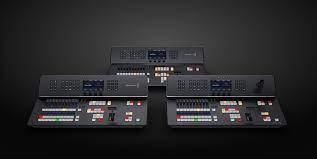
the Blackmagic Design Spares - ATEM Constellation 8K - Mezzanine PCB 1 is the first layer in the high-density I/O (Input/Output) stack of the Constellation 8K.
Because the Constellation 8K is a massive 40-input, 24-output 12G-SDI switcher, Blackmagic uses a "Modular Mezzanine" architecture. While the Main PCB (the motherboard) handles the core 8K switching fabric and effects, Mezzanine PCB 1 is the primary interface for the first bank of physical BNC connectors.
12G-SDI Signal Integrity: Manages the physical interface for a dedicated bank of BNC ports. It includes re-clocking and equalization circuitry to ensure that high-bandwidth 12G and 8K signals remain stable over long cable runs.
8K Quad-Link Aggregation: In 8K mode, this board works with Mezz 2 and 3 to synchronize four 12G-SDI inputs into a single 8K signal.
Tally & CCU Processing: Handles the de-embedding and embedding of camera control data, talkback, and tally for the SDI paths on this board.
Sub-Processing: Performs initial signal "cleaning" before passing the digital video data to the Main PCB's central crosspoint.
Bank-Specific Failure: A specific block of BNC ports (typically the first set of inputs/outputs) is dead, shows "digital snow," or experiences intermittent flickering, while the rest of the switcher is fine.
Physical BNC Damage: If a BNC jack is physically broken, loose, or has a snapped center pin due to cable strain, the entire board must be replaced to maintain broadcast specifications.
System Log Error: The ATEM Setup Utility or the front panel LCD reports a "Hardware Error" specifically identifying "I/O Module 1."
Sync "Dropouts": Signals on this board fail to lock or lose sync when the switcher is set to high-bandwidth standards like 2160p60 or 4320p (8K).
Repair Level: 5 (Expert). 1. BNC Nut Removal: You must remove the silver hex nuts and washers from every BNC port on the rear panel associated with this board. A $14\text{mm}$ deep-well socket is required to avoid scratching the chassis.
2. Vertical Extraction: This board is connected to the Main PCB via massive multi-pin inter-board connectors. Critical Warning: You must lift the board perfectly vertically. Tilting it while the pins are engaged will bend the pins on the motherboard, which is often a non-repairable "bricking" of the entire unit.
Thermal Management: The 12G-SDI transceivers generate intense heat. You must ensure the thermal pads are properly seated against the internal heatsinks or the chassis floor during reassembly.
Static Protocol: This board contains thousands of sensitive traces and high-speed chips. Always use a grounded ESD wrist strap and an anti-static mat.
It is Mezzanine 1 if: The failure is limited to a specific block of SDI ports, but the Multiview output, the front panel LCD, and the network connection are all working perfectly.
It is the Main PCB if: The entire unit won't boot, the Multiview shows garbled video across all windows, or the unit is "invisible" to the network.
Expert Advice: If you are experiencing signal loss on only one or two ports, check for "cold solder joints" on the BNC legs where they meet the PCB. Sometimes a professional reflow of the BNC legs can save you the cost of a full mezzanine board replacement.
Are the failures occurring on a specific block of BNC ports, or are you seeing a general "System" or "Power" error on the front display?

the Blackmagic Design Spares - ATEM Constellation 8K - Mezzanine PCB 1 is the first layer in the high-density I/O (Input/Output) stack of the Constellation 8K.
Because the Constellation 8K is a massive 40-input, 24-output 12G-SDI switcher, Blackmagic uses a "Modular Mezzanine" architecture. While the Main PCB (the motherboard) handles the core 8K switching fabric and effects, Mezzanine PCB 1 is the primary interface for the first bank of physical BNC connectors.
12G-SDI Signal Integrity: Manages the physical interface for a dedicated bank of BNC ports. It includes re-clocking and equalization circuitry to ensure that high-bandwidth 12G and 8K signals remain stable over long cable runs.
8K Quad-Link Aggregation: In 8K mode, this board works with Mezz 2 and 3 to synchronize four 12G-SDI inputs into a single 8K signal.
Tally & CCU Processing: Handles the de-embedding and embedding of camera control data, talkback, and tally for the SDI paths on this board.
Sub-Processing: Performs initial signal "cleaning" before passing the digital video data to the Main PCB's central crosspoint.
Bank-Specific Failure: A specific block of BNC ports (typically the first set of inputs/outputs) is dead, shows "digital snow," or experiences intermittent flickering, while the rest of the switcher is fine.
Physical BNC Damage: If a BNC jack is physically broken, loose, or has a snapped center pin due to cable strain, the entire board must be replaced to maintain broadcast specifications.
System Log Error: The ATEM Setup Utility or the front panel LCD reports a "Hardware Error" specifically identifying "I/O Module 1."
Sync "Dropouts": Signals on this board fail to lock or lose sync when the switcher is set to high-bandwidth standards like 2160p60 or 4320p (8K).
Repair Level: 5 (Expert). 1. BNC Nut Removal: You must remove the silver hex nuts and washers from every BNC port on the rear panel associated with this board. A $14\text{mm}$ deep-well socket is required to avoid scratching the chassis.
2. Vertical Extraction: This board is connected to the Main PCB via massive multi-pin inter-board connectors. Critical Warning: You must lift the board perfectly vertically. Tilting it while the pins are engaged will bend the pins on the motherboard, which is often a non-repairable "bricking" of the entire unit.
Thermal Management: The 12G-SDI transceivers generate intense heat. You must ensure the thermal pads are properly seated against the internal heatsinks or the chassis floor during reassembly.
Static Protocol: This board contains thousands of sensitive traces and high-speed chips. Always use a grounded ESD wrist strap and an anti-static mat.
It is Mezzanine 1 if: The failure is limited to a specific block of SDI ports, but the Multiview output, the front panel LCD, and the network connection are all working perfectly.
It is the Main PCB if: The entire unit won't boot, the Multiview shows garbled video across all windows, or the unit is "invisible" to the network.
Expert Advice: If you are experiencing signal loss on only one or two ports, check for "cold solder joints" on the BNC legs where they meet the PCB. Sometimes a professional reflow of the BNC legs can save you the cost of a full mezzanine board replacement.
Are the failures occurring on a specific block of BNC ports, or are you seeing a general "System" or "Power" error on the front display?